Kód: 53969692
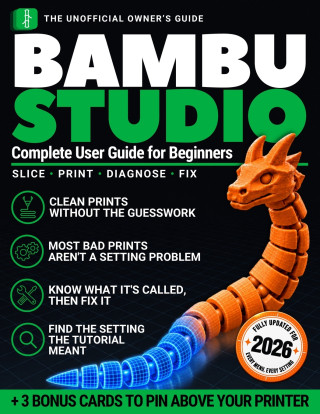
Bambu Studio Complete User Guide for Beginners
Autor Hugo Trent
YOUR SCREEN DOESN'T MATCH THE VIDEO. YOU ARE NOT THE PROBLEM.You paused the video, went looking for the setting he just changed, and it wasn't there. You searched for Print Speed and Bambu Studio doesn't have one. You hit a pop-up ... celý popis


- Jazyk:
 Angličtina
 - Vazba: Brožovaná
- Počet stran: 142
Nakladatelství: Independently published, 2026
- Více informací o knize


Mohlo by se vám také líbit
-

Threshing Day (Wing and Claw Collection)
407 Kč -

Threshing Day (Limited Deluxe Edition)
465 Kč -

What Happened Yesterday
380 Kč -

White Nights
89 Kč -

21 Days of Fear
396 Kč -

Berserk Deluxe Volume 1
879 Kč -

Murdoku
334 Kč -

The Art of Gravity Falls
827 Kč -

The Mirror of Infinite Endings
333 Kč -

The Long-Lived King: An Original The Owl House Graphic Novel
381 Kč -

Berserk Deluxe Volume 2
941 Kč -

Court of Thorns and Roses 6
358 Kč -

Onyx Storm (Deluxe Limited Edition) (The Empyrean, 3)
535 Kč -

Berserk Deluxe Volume 3
803 Kč -

Witch Hat Atelier: Grimoire Edition 1
737 Kč -

Kid's Box New Generation Level 2 Activity Book with Digital Pack British English
251 Kč -

The Courage To Be Disliked
206 Kč -

Jojo's Bizarre Adventure: Part 7--Steel Ball Run, Vol. 8
427 Kč -

Kid's Box New Generation Level 1 Activity Book with Digital Pack British English
251 Kč -

Lord of Mysteries, Vol. 4: The Faceless, Part I
335 Kč -

Kid's Box New Generation Level 3 Activity Book with Digital Pack British English
251 Kč
Darujte tuto knihu ještě dnes
- Objednejte knihu a zvolte Zaslat jako dárek.
- Obratem obdržíte darovací poukaz na knihu, který můžete ihned předat obdarovanému.
- Knihu zašleme na adresu obdarovaného, o nic se nestaráte.
Více informací o knize Bambu Studio Complete User Guide for Beginners
Nákupem získáte 47 bodů
 Anotace knihy
YOUR SCREEN DOESN'T MATCH THE VIDEO. YOU ARE NOT THE PROBLEM.
You paused the video, went looking for the setting he just changed, and it wasn't there. You searched for Print Speed and Bambu Studio doesn't have one. You hit a pop-up asking whether to Transfer, Discard or Save, guessed, and hoped you hadn't broken something.
None of that means you bought the wrong printer. It means the advice was written against a different screen, and nobody handed you the map.
WHAT THIS BOOK DOES DIFFERENTLY
- A translation table, 53 rows of it. What the video calls a setting, what Bambu Studio calls it, and the exact path to click. Elephant's foot, extrusion width, print speed, retraction, and fifty more.
- Every setting is given as a click path, like Prepare > Process > Quality > Layer height, so when the software updates and a control moves you can still find it. That is the one property a slicer book needs to survive its own subject.
- A symptom index in the words you'd actually use. 54 entries under ten plain headings, starting from what the print looks like, not from what the defect is called. You shouldn't need the vocabulary before you're allowed to find the answer.
- Most bad prints are not a settings problem, and chapter one proves it. Wash the plate with dish soap and not isopropyl. Dry the filament. Stop touching the plate. Start on the stock profile. Ten minutes that rule out the causes people spend a weekend chasing in menus.
- The pop-up nobody explains. Transfer, Discard and Save, what each one really does, and what you lose by picking wrong.
- The purge bill, in grams. On one measured six-color print, 225.9 g went to toolchange purge and 58.3 g to the prime tower against 68.5 g of actual part. All four sources of waste named, and how to cut each one without touching gcode.
- Calibration in the right order, the sequence the community settled on, with the setting that quietly undoes the work named before you start. It is not in the slicer at all, which is exactly why it gets missed.
- A settings-to-leave-alone list, not just a settings-to-change list.
WHY A BOOK, WHEN THE VIDEOS ARE THERE
Because you can't pause a video with filament in your hands, and a video can't hold still on the one panel you're stuck on. Every procedure here is numbered, one action per line, written to be read with the software open beside you. The videos worth watching are still listed in the back, credited to the people who made them, with nothing to sign up for.
WHAT IT IS NOT
Not a modeling book: this is about slicing and printing a model, not designing one. Not an OrcaSlicer comparison either, because that question gets answered in a paragraph and then gets in the way. And not a pile of screenshots with the menu names read back to you. Written against Bambu Studio 2.8.2.61, with the version printed inside so you know exactly what was checked and when.
THREE PRINTABLE CARDS, INCLUDED
- Before You Press Print: the seven physical checks, in order, with how long each takes.
- What Went Wrong: thirteen symptoms across sticking, surface and strength, with what each one is called so you can search for it.
- What the Video Calls It: nineteen settings a video is likely to name differently, each with the full click path.
One page each, sized to print at home and pin above the printer. Every row is lifted from the book, so a card can't contradict it.
If your printer has been sitting there since the weekend it failed, start at chapter one.
Parametry knihy
465 Kč
- Plný název: Bambu Studio Complete User Guide for Beginners
- Podnázev: Why Your Screen Never Matches the Tutorial, What Every Setting Does, and How to Fix Any Failed Print So Your 3D Printer Never Gathers Dust
- Autor: Hugo Trent
- Jazyk: Angličtina
- Vazba: Brožovaná
- Počet stran: 142
- EAN: 9798175577090
- ID: 53969692
- Nakladatelství: Independently published
- Hmotnost: 348 g
- Rozměry: 280 × 216 × 8 mm
- Datum vydání: 19. September 2026
Osobní odběr Praha, Brno a 47901 dalších
Copyright ©2008-26 nejlevnejsi-knihy.cz Všechna práva vyhrazenaSoukromíCookies

 Vrácení do měsíce
 571 999 099 (8-15.30h)