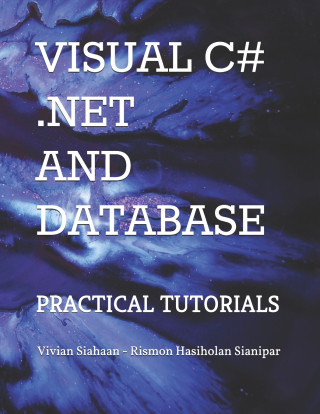
Kód: 37713449
Visual C# .Net and Database
Autor Rismon Hasiholan Sianipar, Vivian Siahaan
This book aims to develop a database-driven desktop application that readers can develop for their own purposes to implement database-oriented digital image processing, machine learning, and image retrieval applications.In Tutoria ... celý popis


- Jazyk:
 Angličtina
 - Vazba: Brožovaná
- Počet stran: 402
Nakladatelství: Independently Published, 2020
- Více informací o knize


Mohlo by se vám také líbit
-

Bloodborne, 1 - 3 Boxed set
779 Kč -

Great American Burger Book (Expanded and Updated Edition)
490 Kč -

SPELL OF A STORY
351 Kč -

Toulouse Travel Guide: Sightseeing, Hotel, Restaurant & Shopping Highlights
299 Kč -

Criptomonedas
458 Kč -

S ljubavlju, Lukov
575 Kč -

In sogno ho visto il mondo. Testo estone a fronte
547 Kč -

Auto/Biographical Approach to Learning Disability Research
3369 Kč -

Danger! and Other Stories
237 Kč -

Les Russes à Paris 1919-1939
634 Kč -

From the Steel City to the White City
359 Kč -

Effect of the Indian classical Raga in Treatment of BP and Diabetes
1115 Kč -

SPECIMEN (MODULOGRAPHE CARRE)
580 Kč -

Como Lidar com um Diabético Teimoso: Perigos, Subterfúgios e Mazelas de uma Cuidadora
434 Kč
Dárkový poukaz: Radost zaručena
- Darujte poukaz v libovolné hodnotě a my se postaráme o zbytek.
- Poukaz se vztahuje na celou naši nabídku.
- Elektronický poukaz vytisknete z e-mailu a můžete ihned darovat.
- Platnost poukazu je 12 měsíců od data vystavení.
Více informací o knize Visual C# .Net and Database
Nákupem získáte 59 bodů
 Anotace knihy
This book aims to develop a database-driven desktop application that readers can develop for their own purposes to implement database-oriented digital image processing, machine learning, and image retrieval applications.In Tutorial 1, you will perform the steps necessary to add 6 tables using Visual C# into ImageProc database. This table has sixteen fields: OfficerID, FirstName, LastName, RegNumber, BirthDate, AppDate, Gender, Status, Rank, Address, Mobile, Phone, Email, Description, PhotoFile, and FingerFile). You need seventeen label controls, two picture boxes, ten text boxes, two comboxes, one check box, two date time pickers, one openfiledialog, and one printpreviewdialog. You also need four buttons for navigation, eight buttons for utilites, one button for searching officer's name, one button to upload officer's photo, and one button to upload officer's fingerprint.In Tutorial 2, you will perform the steps necessary to create and implement police station form. In this tutorial, you will build such a form for PoliceStation table. This table has seven fields: PSID, OfficerID, PSName, City, Address, Phone, and Description. You need eight label controls, six text boxes, two comboxes, one check box, and one printpreviewdialog. You also need four buttons for navigation, eight buttons for utilites, and one button for searching officer's name. Place these controls on the form.In Tutorial 3, you will build such a form for Accused table. This table has thirteen fields: AccusedID, FullName, MotherName, CrimeCase, BirthDate, Gender, Address, Mobile, Phone, Email, Description, PhotoFile, and FingerFile). The form will also have the capability of navigating from one record to another. You need fourteen label controls, two picture boxes, nine text boxes, two comboxes, one date time picker, one openfiledialog, and one printpreviewdialog. You also need four buttons for navigation, eight buttons for utilites, one button for searching accused's name, one button to upload accused's photo, and one button to upload accused's fingerprint.In Tutorial 4, you will build such a form for Witness table. This table has thirteen fields: WitnessID, FullName, MotherName, CrimeCase, BirthDate, Gender, Address, Mobile, Phone, Email, Description, PhotoFile, and FingerFile). You need fourteen label controls, two picture boxes, nine text boxes, two comboxes, one date time picker, one openfiledialog, and one printpreviewdialog. You also need four buttons for navigation, eight buttons for utilites, one button for searching witness's name, one button to upload witness's photo, and one button to upload witness's fingerprint.In Tutorial 5, you will build such a form for Victim table. This table has thirteen fields: VictimID, FullName, MotherName, CrimeCase, BirthDate, Gender, Address, Mobile, Phone, Email, Description, PhotoFile, and FingerFile). You need fourteen label controls, two picture boxes, nine text boxes, two comboxes, one date time picker, one openfiledialog, and one printpreviewdialog. You also need four buttons for navigation, eight buttons for utilites, one button for searching victim's name, one button to upload victim's photo, and one button to upload victim's fingerprint.In Tutorial 6, you will build such a form for CrimeReg table. This table has fourteen fields: CRID, CRNumber, PSID, VictimID, AccusedID, DateReport, DateCrime, Arrested, CaseStatus, Description, Feature1, Feature2, Feature3, and Feature4. You need thirty two label controls, seven text boxes, ten comboxes, one check box, two date time pickers, six picture boxes, and one printpreviewdialog. You then need four buttons for navigation, eight buttons for utilites, and one button for searching crime register number. You also need button to save every feature.
Parametry knihy
589 Kč
- Plný název: Visual C# .Net and Database
- Podnázev: Practical Tutorials
- Autor: Rismon Hasiholan Sianipar, Vivian Siahaan
- Jazyk: Angličtina
- Vazba: Brožovaná
- Počet stran: 402
- EAN: 9798550689660
- ID: 37713449
- Nakladatelství: Independently Published
- Hmotnost: 925 g
- Rozměry: 279 × 216 × 21 mm
- Datum vydání: 21. October 2020
Oblíbené z jiného soudku
-

Moonwalk
263 Kč -

The Score
243 Kč -

Berserk Deluxe Volume 1
804 Kč -

The Mistake
292 Kč -

The Deal
266 Kč -

Berserk Deluxe Volume 2
942 Kč -

Jujutsu Kaisen, Vol. 30
220 Kč -
Murdoku
339 Kč -

Threshing Day (Wing and Claw Collection)
400 Kč -

Berserk Deluxe Volume 3
781 Kč -

White Nights
95 Kč -

The Goal
253 Kč -

Chainsaw Man, Vol. 21
240 Kč -

Jujutsu Kaisen, Vol. 29
225 Kč -

Jujutsu Kaisen, Vol. 26
240 Kč -

Lord of Mysteries, Vol. 3: The Clown, Part III
373 Kč -

The Legacy
243 Kč -

Berserk Deluxe Volume 5
862 Kč -

Threshing Day (Limited Deluxe Edition)
488 Kč -

Onyx Storm (Deluxe Limited Edition) (The Empyrean, 3)
526 Kč -
Invincible Compendium Volume 2
1108 Kč -

Berserk Deluxe Volume 4
854 Kč -

Lord of Mysteries, Vol. 1: The Clown, Part I
368 Kč -

Invincible Compendium Volume 3
1123 Kč -

JoJo's Bizarre Adventure: Part 7--Steel Ball Run, Vol. 7
415 Kč -

Jujutsu Kaisen, Vol. 1
241 Kč -

Witch Hat Atelier: Grimoire Edition 1
786 Kč -

Restitution
243 Kč -

The Courage To Be Disliked
221 Kč -

Witch Hat Atelier: Grimoire Edition 2
786 Kč -

The Count of Monte Cristo
262 Kč -

Kid's Box New Generation Level 2 Activity Book with Digital Pack British English
265 Kč -
Murdoku Volume 2: Back in Time
329 Kč -

Six of Crows: A Darker Shore: Letters from Ketterdam
413 Kč -

Heated Rivalry
243 Kč -

Heartstopper Volume 6
315 Kč -

Jujutsu Kaisen, Vol. 2
240 Kč -

Jujutsu Kaisen, Vol. 25
220 Kč -

Fourth Wing
536 Kč -

Onyx Storm
227 Kč -

Veil Volume 1
368 Kč -

Moonwalk: A Memoir
550 Kč -

Yesteryear
444 Kč -

Berserk Deluxe Volume 6
837 Kč -

Iron Flame
526 Kč -
Invincible Compendium Volume 1
1328 Kč -
Throne of Glass Box Set
1801 Kč -

Berserk Deluxe Volume 7
854 Kč -

Jujutsu Kaisen, Vol. 28
199 Kč
Osobní odběr Praha, Brno a 46922 dalších
Copyright ©2008-26 nejlevnejsi-knihy.cz Všechna práva vyhrazenaSoukromíCookies

 Vrácení do měsíce
 571 999 099 (8-15.30h)